<?xml version="1.0" encoding="UTF-8"?><feed xmlns="http://www.w3.org/2005/Atom" xmlns:creativeCommons="http://backend.userland.com/creativeCommonsRssModule" xmlns:re="http://purl.org/atompub/rank/1.0">
    <title type="text">Windows masaüstüne arkaplan resmi nasıl koyarım? (kişiselleştir yok) - Sorcev</title>
    <link rel="self" href="https://sorcev.com/windows-masaustune-arkaplan-resmi-nasil-koyarim-kisisellestir-yok/feed" type="application/atom+xml" />
    <link rel="alternate" href="https://sorcev.com/windows-masaustune-arkaplan-resmi-nasil-koyarim-kisisellestir-yok" type="text/html" />
    <subtitle>Sorcevden En iyi 30</subtitle>
    <updated>2017-10-20T12:24:57Z</updated>
    <id>https://sorcev.com/windows-masaustune-arkaplan-resmi-nasil-koyarim-kisisellestir-yok</id>
    <creativeCommons:license>http://www.creativecommons.org/licenses/by-sa/3.0/rdf</creativeCommons:license>

    <entry>
        <id>https://sorcev.com/windows-masaustune-arkaplan-resmi-nasil-koyarim-kisisellestir-yok</id>
        <re:rank scheme="sorcev.com">3</re:rank>
        <title type="text">Windows masaüstüne arkaplan resmi nasıl koyarım? (kişiselleştir yok)</title>
            <category scheme="https://sorcev.com/kategori/" term="Bilgisayar" />
        <author>
            <name>Sibella Bodir</name>
        </author>
        <link rel="alternate" href="https://sorcev.com/windows-masaustune-arkaplan-resmi-nasil-koyarim-kisisellestir-yok" />
        <published>2018-02-15T16:28:46+00:00</published>
        <updated>2018-02-15T16:28:46+00:00</updated>
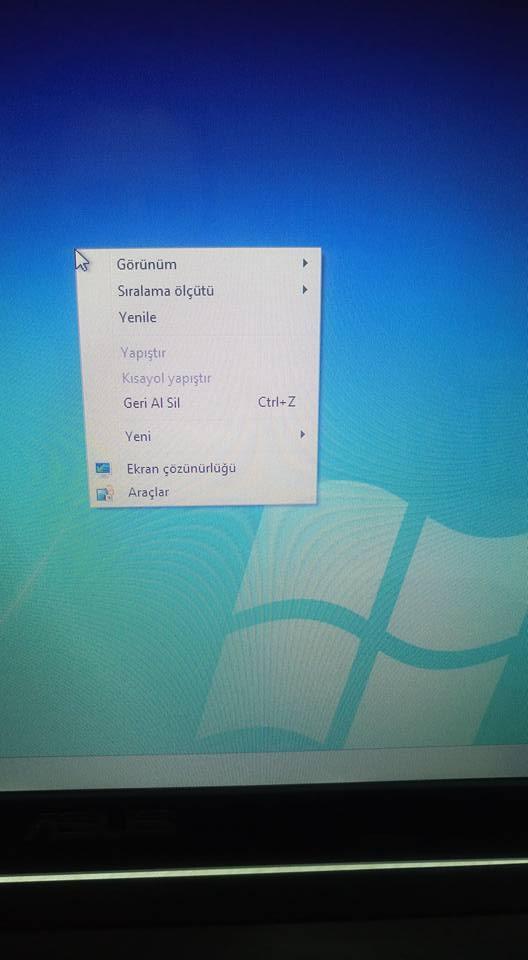
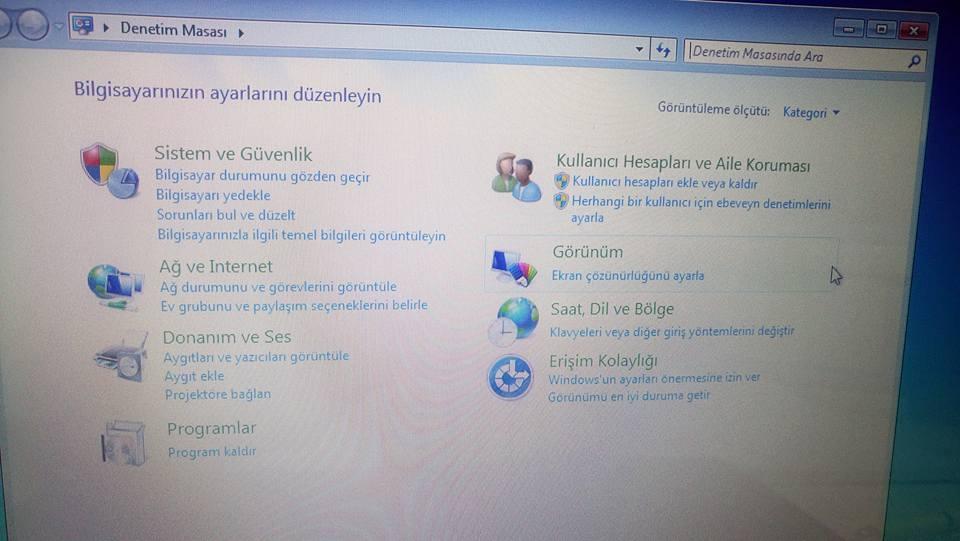
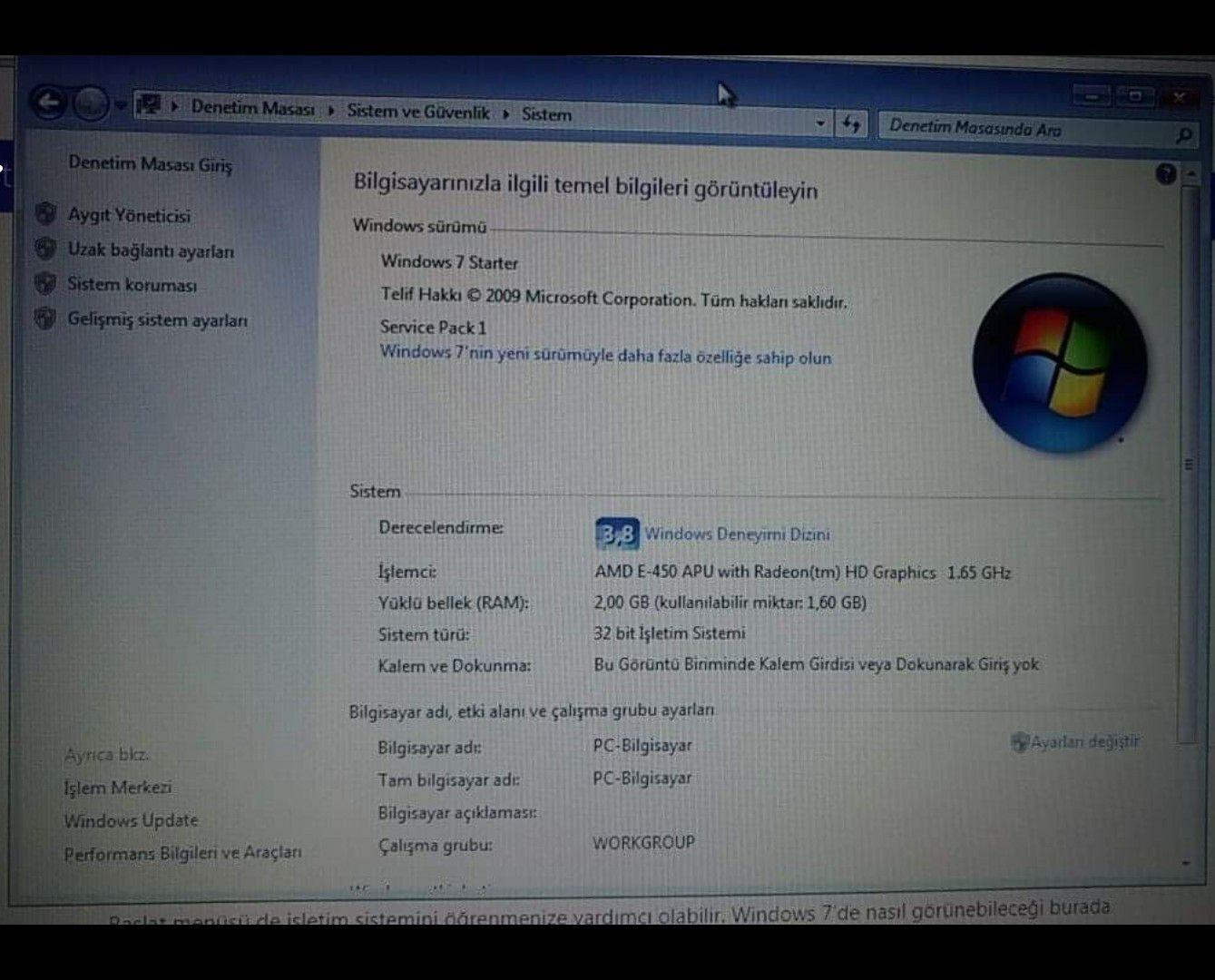
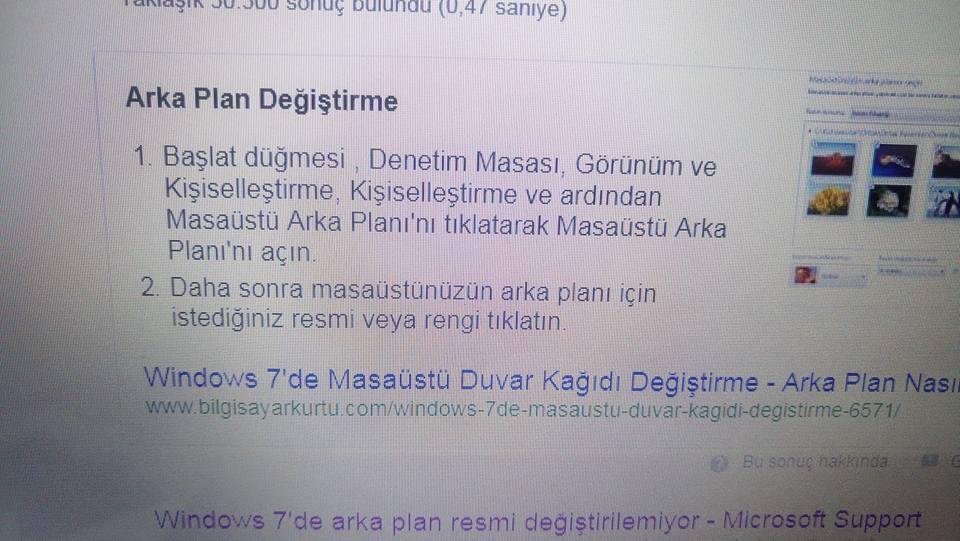
        <summary type="html"><![CDATA[<p> TESEKKUR EDERIM HEPINZE </p> <p>  Iyi geceler arkadașlar bilgisyarıma masaüstüne fotoğraf koymak istiyorum fakat masaüstü kisisellestir secenegi yok bunu nasıl yapabilirim. Google bakiyorum fakat onlar in anlattiklari gibi bende o secenek yok nasıl yapabilirim </p><figure><a target="_blank" data-href="/cevapimg/0/0/com-5cjvlyncyeqojkk19zz0.jpg" href="/cevapimg/0/0/com-5cjvlyncyeqojkk19zz0.jpg"><img src="/cevapimg/605/0/com-5cjvlyncyeqojkk19zz0.jpg" alt="com-5cjvlyncyeqojkk19zz0.jpg" width="605" height="340" /></a></figure><figure><a target="_blank" data-href="/cevapimg/0/0/com-z6u5xnjvkpzoriav0wve.jpg" href="/cevapimg/0/0/com-z6u5xnjvkpzoriav0wve.jpg"><img src="/cevapimg/605/0/com-z6u5xnjvkpzoriav0wve.jpg" alt="com-z6u5xnjvkpzoriav0wve.jpg" width="528" height="960" /></a></figure><figure><a target="_blank" data-href="/cevapimg/0/0/com-e345ijeutg8seiqtgv53.jpg" href="/cevapimg/0/0/com-e345ijeutg8seiqtgv53.jpg"><img src="/cevapimg/605/0/com-e345ijeutg8seiqtgv53.jpg" alt="com-e345ijeutg8seiqtgv53.jpg" width="605" height="340" /></a></figure>]]></summary>
    </entry>
    <entry>
        <id>https://sorcev.com/windows-masaustune-arkaplan-resmi-nasil-koyarim-kisisellestir-yok/370137</id>
        <re:rank scheme="https://sorcev.com">6</re:rank>
        <title type="text">Windows masaüstüne arkaplan resmi nasıl koyarım? (kişiselleştir yok) sorusu için  Mete Demirbay kullanıcının cevabı</title>
        <author>
            <name>Mete Demirbay</name>
        </author>
        <link rel="alternate" href="https://sorcev.com/windows-masaustune-arkaplan-resmi-nasil-koyarim-kisisellestir-yok/370137" />
        <published>2018-02-15T17:51:48+00:00</published>
        <updated>2018-02-15T17:51:48+00:00</updated>
        <summary type="html"><![CDATA[<p>Windows sürümü farklı bir sürüm olabilir sizin kullandığınız sürümle aratırsanız kolayca bulabilirsiniz.</p>]]></summary>
    </entry>
    <entry>
        <id>https://sorcev.com/windows-masaustune-arkaplan-resmi-nasil-koyarim-kisisellestir-yok/370138</id>
        <re:rank scheme="https://sorcev.com">6</re:rank>
        <title type="text">Windows masaüstüne arkaplan resmi nasıl koyarım? (kişiselleştir yok) sorusu için  Sadettin Tokaç kullanıcının cevabı</title>
        <author>
            <name>Sadettin Tokaç</name>
        </author>
        <link rel="alternate" href="https://sorcev.com/windows-masaustune-arkaplan-resmi-nasil-koyarim-kisisellestir-yok/370138" />
        <published>2018-02-15T18:14:01+00:00</published>
        <updated>2018-02-15T18:14:01+00:00</updated>
        <summary type="html"><![CDATA[<p>Bilgisayarin ein 7 starter versiyon o yuzden yok win 7 ultimate tafsiye ederim iyi aksamlar</p>]]></summary>
    </entry>
    <entry>
        <id>https://sorcev.com/windows-masaustune-arkaplan-resmi-nasil-koyarim-kisisellestir-yok/370139</id>
        <re:rank scheme="https://sorcev.com">6</re:rank>
        <title type="text">Windows masaüstüne arkaplan resmi nasıl koyarım? (kişiselleştir yok) sorusu için  Nazım Eyllnhr kullanıcının cevabı</title>
        <author>
            <name>Nazım Eyllnhr</name>
        </author>
        <link rel="alternate" href="https://sorcev.com/windows-masaustune-arkaplan-resmi-nasil-koyarim-kisisellestir-yok/370139" />
        <published>2018-02-15T18:49:52+00:00</published>
        <updated>2018-02-15T18:49:52+00:00</updated>
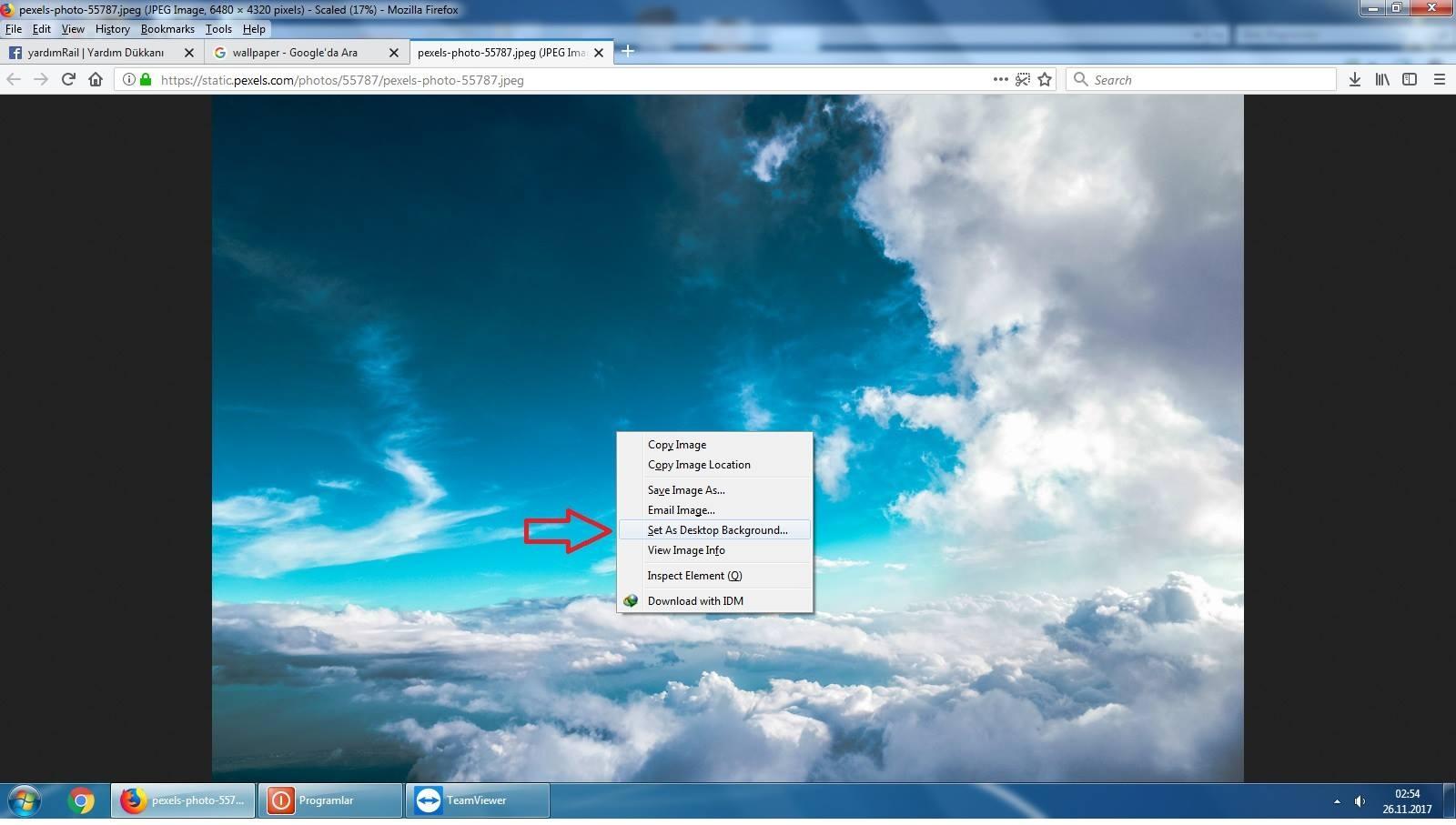
        <summary type="html"><![CDATA[<p>Windows Ultimate sürümü olmalı. Şuan için aklıma gelen öneri: Firefox tarayıcı var ise google'dan büyük bir resim bulun. "Resmi masaüstü olarak ayarla" gibi bir seçenek çıkar üzerne sağ tıklayınca.</p>]]></summary>
    </entry>
    <entry>
        <id>https://sorcev.com/windows-masaustune-arkaplan-resmi-nasil-koyarim-kisisellestir-yok/370146</id>
        <re:rank scheme="https://sorcev.com">6</re:rank>
        <title type="text">Windows masaüstüne arkaplan resmi nasıl koyarım? (kişiselleştir yok) sorusu için  Sibella Bodir kullanıcının cevabı</title>
        <author>
            <name>Sibella Bodir</name>
        </author>
        <link rel="alternate" href="https://sorcev.com/windows-masaustune-arkaplan-resmi-nasil-koyarim-kisisellestir-yok/370146" />
        <published>2018-02-15T19:48:31+00:00</published>
        <updated>2018-02-15T19:48:31+00:00</updated>
        <summary type="html"><![CDATA[<p><figure><a target="_blank" data-href="/cevapimg/0/0/com-9b30e9bd14xbyis5h3ng.jpg" href="/cevapimg/0/0/com-9b30e9bd14xbyis5h3ng.jpg"><img src="/cevapimg/605/0/com-9b30e9bd14xbyis5h3ng.jpg" alt="com-9b30e9bd14xbyis5h3ng.jpg" width="605" height="487" /></a></figure></p>]]></summary>
    </entry>
    <entry>
        <id>https://sorcev.com/windows-masaustune-arkaplan-resmi-nasil-koyarim-kisisellestir-yok/370147</id>
        <re:rank scheme="https://sorcev.com">6</re:rank>
        <title type="text">Windows masaüstüne arkaplan resmi nasıl koyarım? (kişiselleştir yok) sorusu için  Necat Yörükoğlu kullanıcının cevabı</title>
        <author>
            <name>Necat Yörükoğlu</name>
        </author>
        <link rel="alternate" href="https://sorcev.com/windows-masaustune-arkaplan-resmi-nasil-koyarim-kisisellestir-yok/370147" />
        <published>2018-02-15T20:24:49+00:00</published>
        <updated>2018-02-15T20:24:49+00:00</updated>
        <summary type="html"><![CDATA[<p>Arka plan yapmak istedigin fotografa sag tıklayıp arka plan resmi yap diyebilirsin</p>]]></summary>
    </entry>
    <entry>
        <id>https://sorcev.com/windows-masaustune-arkaplan-resmi-nasil-koyarim-kisisellestir-yok/370153</id>
        <re:rank scheme="https://sorcev.com">6</re:rank>
        <title type="text">Windows masaüstüne arkaplan resmi nasıl koyarım? (kişiselleştir yok) sorusu için  Sadettin Tokaç kullanıcının cevabı</title>
        <author>
            <name>Sadettin Tokaç</name>
        </author>
        <link rel="alternate" href="https://sorcev.com/windows-masaustune-arkaplan-resmi-nasil-koyarim-kisisellestir-yok/370153" />
        <published>2018-02-15T21:50:19+00:00</published>
        <updated>2018-02-15T21:50:19+00:00</updated>
        <summary type="html"><![CDATA[<p>Gerekli cevabi verdigim halde neden hala ugrasiyorsun :))</p>]]></summary>
    </entry>
    <entry>
        <id>https://sorcev.com/windows-masaustune-arkaplan-resmi-nasil-koyarim-kisisellestir-yok/370182</id>
        <re:rank scheme="https://sorcev.com">6</re:rank>
        <title type="text">Windows masaüstüne arkaplan resmi nasıl koyarım? (kişiselleştir yok) sorusu için  Sadettin Tokaç kullanıcının cevabı</title>
        <author>
            <name>Sadettin Tokaç</name>
        </author>
        <link rel="alternate" href="https://sorcev.com/windows-masaustune-arkaplan-resmi-nasil-koyarim-kisisellestir-yok/370182" />
        <published>2018-02-15T22:19:15+00:00</published>
        <updated>2018-02-15T22:19:15+00:00</updated>
        <summary type="html"><![CDATA[<p>https://www.google.com.tr/amp/www.nebigarci.net/windows-7-starterda-masaustu-arkaplan-degistirme/amp bu linkte anlatim mevcut</p>]]></summary>
    </entry>
    <entry>
        <id>https://sorcev.com/windows-masaustune-arkaplan-resmi-nasil-koyarim-kisisellestir-yok/370186</id>
        <re:rank scheme="https://sorcev.com">6</re:rank>
        <title type="text">Windows masaüstüne arkaplan resmi nasıl koyarım? (kişiselleştir yok) sorusu için  Nazım Eyllnhr kullanıcının cevabı</title>
        <author>
            <name>Nazım Eyllnhr</name>
        </author>
        <link rel="alternate" href="https://sorcev.com/windows-masaustune-arkaplan-resmi-nasil-koyarim-kisisellestir-yok/370186" />
        <published>2018-02-15T23:34:17+00:00</published>
        <updated>2018-02-15T23:34:17+00:00</updated>
        <summary type="html"><![CDATA[<p><figure><a target="_blank" data-href="/cevapimg/0/0/com-vet5shxaro8da05jz624.jpg" href="/cevapimg/0/0/com-vet5shxaro8da05jz624.jpg"><img src="/cevapimg/605/0/com-vet5shxaro8da05jz624.jpg" alt="com-vet5shxaro8da05jz624.jpg" width="605" height="342" /></a></figure></p>]]></summary>
    </entry>
</feed>